

As you’ve propably read in my About section, Tech Flaws isn’t just about bitching about inapt engineers & designers but also about finding userfriendly devices that are designed with some common sense. That’s why – despite my previous bad experience with Philips – I’ve tested both 5990 and 3260 and decided to compile a FAQ from various forum entries. This is due to the player’s potential as well as to find people willing to donate so further features can be added by firmware modders (please check out this thread). I’m also gonna break blogging procedure by updating this post instead of adding new blog entries whenever this FAQ gets updated.
What USB devices are supported?
You can attach pretty much any device with an USB slot like USB sticks, card readers (in case your pics are stored on SD card) and USB HDDs albeit the latter aren’t officially supported. That is because Philips can’t guarantee compatibility since some of the 2.5″ drives need more power on startup than the 500mA defined in the USB specification. Also there’s been some concern that attaching USB-powered drives for extended periods of time might put too much strain on the Philips’ power supply and fry it eventually. Since some enclosure manufacturers do sell different HDD brands with their label one can’t know in advance what drive will work which means you gotta try or be on the safe side by using 3.5″ HDDs with external power instead. You are welcome to share your experiences in the comment section below.
What file systems are supported?
Unfortunately FAT32 is the lowest common denominator since it is supported by almost any OS out there so we’re stuck with it on standalone devices for the time being. If your external drive has several partitions with other filesystems like NTFS, you’ll only get to see those that are formatted to FAT32 (no matter if they are primary or extended partitions).
What partition/folder/file/filename sizes are supported?
According to the manual the DVP can handle 300 folders with 648 files each. FAT32 supports up to 8 TB for partitions (1 TB drives have been reported to work fine so far) and 4 GB for files as well as Long filenames of which the Philips filebrowser displays only a puny 14 chars.
Micros~1 limited FAT32 partition creation on Windows 2000 and newer to 32 GB. To create larger partitions on these systems use “fat32format.exe” (Google) under Start > Run > cmd [ENTER].
What media/file types/formats/codecs are supported?
As mentioned in the manuals (also downloadable as pdf from Philips) the players can handle avi, mpg, vob (also with AC3 sound), mp3, wma (no DRM), jpg from USB as well as CD-R(W) and DVD±R(W) DL. The 5990 additionally plays: mp4 (Nero Digital, xvid/mp3), wmv, ogm and transmits DTS audio via digital output to a receiver and handles GMC and QPel on xvid/divx. Please bear in mind that avi/wmv are containers that can hold a lot of different streams as well as codecs which are not necessarily supported. The player can handle divx 3, 4, 5, 6 (5990: + divx ultra) and xvid but only up to the max standard resolution of 720x576p i.e. no High Defintion. Subtitles must be srt or idx/sub (not compressed with rar) and should be named according to the video file since they’re not listed in the filebrowser, e.g.
my.favourite.show.1×01.avi or my.favourite.show.1×01.idx
my.favourite.show.1×01.srt my.favourite.show.1×01.sub
What about DVD-Video playback from USB?
The Philips does not display IFOs so if you do have a DVD-Video ripped to HDD you can only playback VOBs. This means you’ll have short but noticeable breaks between VOBs, messed up subtitles and no correct aspect ratio, menus nor chapters. You also have to manually adjust audio streams whenever a new VOB is started automatically if you’re not listening to the first stream in the file.
Contrary to some Multimedia-HDDs there’s currently no standalone out there that does playback DVDs properly from USB. There’s no official confirmation on this but there may be several reasons, a) legal: the DVD-Forum license does not permit it; b) technical: ifo files on DVDs address titles by sectors which are not present on a HDD filesystem so at least mapping sectors would be required. According to New_Age (one of the best MTK firmware modders) one would need to get their hands on ARM source code to add such a feature which is not likely to happen.
What about file order in the file browser?
Due to limitations of the FAT32 file system standalones as well as car radios and mp3 players that don’t have a database suffer from the same problem: files are displayed in the very order they’ve been written to the FAT which even gets more messy in case you deleted some files from in between before copying over new files. Cause if the new files/entries are larger than the previous ones copying over files numbered from 1 to 20 might get them listed in a different order. So your best bet to get files sorted in alphabetical order is using DriveSort.
Avis over 2 GB take forever to load, what do I do?
You need to remux them with AvimuxGUI which is done in a few minutes without re-encoding as explained by Squash on the Videohelp forums.
Some files are displayed with a wrong aspect ratio, what do I do?
First of all you should stop downloading crappy encodes from the net and/or use AutoGK for encoding your originals to xvid. If avis just weren’t encoded properly you can try rewriting headers with MPEG4Modifier from moitah.net or use DVDpatcher for setting the correct DAR in mpegs.
During playback of some avis video stops for a few seconds while audio continues, what do I do?
The Philips seems to have trouble with packed bitstream files. You can recode them on the fly with MPEG4Modifier from moitah.net.
What is the front display used for, ID3 tags?
You wish! Unfortunately the display only shows elapsed time with 5 digits (h:mm:ss) and the track number on start of a track for 1 (MP3) and 5 (Audio CD) seconds. Pressing ‘display’ on the remote doesn’t change that and of course there’s no button to switch folders on MP3 discs nor a ‘play all’-mode so that the player would start playback of the next album folder automatically.
How do I set the player to Region Free?
Goto Setup > Preferences and press 138931 on your remote. Press up to select “0” and hit setup to exit.
Is there a firmware mod available?
Fortunately yes! Vb6rocod has done a marvelous job modding them with great new features like:
- new skins, OSD font (text and graphic) and filebrowser (with scrollbars, outlined font, new icons)
- filebrowser lists up to 48 chars
- Auto-load adjustable subtitles (font, size, position)
Read more about it on his homepage and blog. Other firmware modders might start adding further features but this might require donations to enable them to purchase the player(s) first. Please read more about it.
How do I flash the player with new firmware?
First of all open the tray and press ’55’ on your remote to see what player version you have, e.g. 12 is the european model and 37 the US model, you must not flash your player with the firmware from another model or you will brick it! Then check your current firmware by selecting Setup > General. Press 1379 on your remote to check the last two digits of the version number.
Download the latest original firmware from Philips and follow this procedure:
- extract the bin file from the donwloaded archive to the root of an USB stick
- remove any disc from the unit
- reset your player to default settings so it is in a defined state and set to english language
- attach the stick and switch to USB if the unit doesn’t do so automatically
- press play when advised to do so on the screen
- WAIT until the tray opens and the LED on your USB stick stops blinking
- plug off the stick
- WAIT till the player closes the tray automatically and reboots
- do another reset to default settings for good measure.
Remember to delete the bin file from the USB stick before you plug it in next time to playback media so you don’t accidentally flash the player again. Download vb6rocod‘s latest firmware mod (be sure to use the same version number as Philips’ original firmware) and extract the bin file with the corresponding codepage, e.g.:
- 1250 — East European Latin
- 1251 — Cyrillic
- 1252 — West European Latin
- 1253 — Greek
- 1254 — Turkish
and repeat above procedure. Note that you can also revert to the original firmware applying the very same steps. Of course any problems resulting from flashing are your responsibility. In case you bricked your player you may be able to revive it using this cable.
How do I change volume with the remote?
The 5990 remote cannot change analogue volume except on a Philips TV. That is because you are supposed to connect the player via HDMI to your AVR or TV which in turn will decode the digital signal and only then adjust volume. The 3260 remote lacks volume keys completely but you can change analogue volume by mapping them to less used keys like Repeat/Repeat A-B easily with this tool: Remote Philips 3260.
What chipset is used?
Both players are equipped with Mediatek chipsets, the 3260 uses a MT1389DE, the 5990 a MT1389DXE (picture thanks to Huey) as shown below:
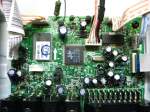

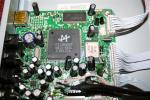
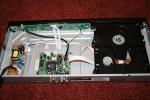
Click on a thumbnail to get a larger image and then again on the larger image to get the original size.
How do I mod myself?
 Tech Flaws
Hi, I just got a DVP5990 and everything seems to work fine but when I tried playing avi file using the usb, the movies plays a little jerky (horizontal black little lines in some parts of the screen show up) at times. any fix or help to fix. Thanks.
Hi – I just got a DVP 5992 from Costco (US) but it apparently will not work with a long HDMI cable (25-30 ft.). Has anyone here been using this player with along run of HDMI? My setup is using a ceiling mounted projector, so I cannot avoid the long run of cable.
Avi with AC3 sound should work. Maybe it’s not properly muxed so you can try remuxing the files with AVI-Mux GUI or Virtualdubmod. Alternatively re-author a 1 min clip from one of your original DVDs with DVD Shrink and encode it with AutoGK keeping the AC3 sound to see if this works.
Audio would not play on 5990 in .avi files.
i have problem with some .avi files – audio will not work. In all these cases GSpot reports ac3 (0x2000) Dolby Laboratories, Inc as a codec.
But I understand 5990 suppose to work with ac3’s Any help?
Both should do it flawlessly, I’ve just tried it with my 3260 and you can ff at 32x too.
Hi@all,
I record from digital sat (DVB-S) and have now as audio mp2. Can the 3260 and/or 5990 play without any problems this format? also after “fast forward” seek? Here is a test file: megaupload.com/de/?d=PM5NZFIS
Thanx very much for help!
That DVD with the problem menu burned on a double layer without menu also played back OK, so maybe the Philips doesn’t like double layers with menus which are created with DVD Flick (it’s not like I have made a lot of DL discs with this program). Once the player finds the menu, everything can be played as normal, it’s not like the disc is totally unplayable…
I’ve only tried DLs with menus so far and all of them needed considerably more time to get started. So far I’ve chalked it up to DLs in general but maybe you’re right, and the menu is something the player is having trouble with on DLs.
I’ve encountered another “no rhyme or reason” problem with this unit.
I was playing back some double layer DVD of jazz performances from TV broadcasts that I had created myself using DVD Flick (to make the DVD) and Imgburn (to burn it).
From the time I hit “play” until the menu (created with DVD Flick) appeared was well over a minute. This behavior reminded me of what I’ve read about Blu-Ray players having a big delay after you hit “play,” or experienced using the Philips DVD642-37, where media with multiple DIVX data files would take forever to display the index.
I then discovered I had this problem with a couple of other double layers that I created recently. But I also had NO problem with some double layers that I had created before and after burning this particular jazz DVD.
What was weird — I pulled out another double layer using some of the same jazz broadcast material which was created and burned months ago with a different burner and different brand of DVDs, and it had the same problem!
I bought Philips 3260/12 3 days a go and already returned it.
My experience – 2 things did not work as googd as I wanted.
Playing divx movie from SD card (using USB card reader did not work and also some of my divx movies on cd played with with picture delazed after audio about 6 sec.
Playing them on PC everzthing was OK.
Playing dvd and movies from USB was OK.
I decided to download firmware (one from user vb5rocod, which is mentioned on this web page and later original from philips web page)
After recording this firmware none of my dvd movies played. Player was unable to even load these discs. Playing divx movies was OK with all new setting as changing font, color of subtitles etc.
After 3 days of struggling I returned it to shop.
@Jeris
Took me some time but I finally dug up some cheapo USB 6 in 1 card reader (Abocom Apollo) from my stash and hooked it up to my 3260. Both CF card and SD card were recognized and I could playback mp3s, jpegs and avis off of them.
@Mr. Mike
Usually I’d say it’s due to your use of DL blanks that most players still can’t read as good as single layer, escpecially if they are no brands like Verbatim. I’ve never used DVD Flick but maybe you have some non-standard settings and the Philips is picky or you have exceeded the max bitrate for DVDs?
Pursuant to above comments I made about clipped audio (which only happens with coax audio through my amp when HDMI is connected to the TV for video), I called Philips, but they were not able to help me, because they had no similar issues in their tech database. The person I spoke to said that they have received calls from time to time about people with HDMI being able to receive audio and not video and vice versa, though.
I posted in a forum on some other site, and a person there said that he had audio clipping with a Sony amp (mine is a Yamaha) under similar circumstances.
I summarized the problem in a page on my own WWW site if anyone is interested: http://www.mjq.net/dvdplayerproblem.htm
I have no idea cause I don’t know what power cord they’re selling this player with in France nor what kinda power outlets are used in India. Just mail Philips support about it, I’m sure they can tell you.
I have purchased a Philips DVD player model number – DVP 3260 from France. Please let me know whether this will work in India. Thanks in advance.
I’ve read on some forum that 1 TB (self powered, not USB powered!) would work but maybe it doesn’t so you might wanna try smaller partitions. If that doesn’t help I’m afraid you’re out of luck due to an incompatible harddrive since Philips officially only supports USB sticks.
I plugged a 1TB external HD into this player and I receive an error message stating; “usb hub not supported” I’ve formatted the drive to fat32, any idea what the cause is?
Thanks for your comment. I’ll be sure and send the unedited version to Philips.
I haven’t had any problems with MP3s in the way you describe. In fact, I just burned some to a CD-RW as a test, and when I jumped to the next track they all played OK.
It would be nice if Philips would make it possible to get rid of that message about starting from the beginning by hitting “[PREV]” when a disc resumes. I mean — once is enough! Or at least make it possible to make the message disappear by hitting some key.
I’ve shortened your comment a bit. Point is, I’ve read about this problem before and I’m having similar issues with mp3 playback (though not video – yet!). When the next track starts, the first or so second is skipped. I’ve verified that this is a problem of the original firmware and mailed Philips support about it. The more people do this the sooner Philips might look into it and release a firmware update.
This DVP 5990 player has a very peculiar problem which is driving me nuts.
Whenever I start a DVD or use the Previous/Next buttons to skip to the next title/chapter/track, and there is audio at that point, there is a brief (1-2 second) delay in the audio, even though you can see the picture.
This also happens when the DVD player just advances to the next title/chapter/track on its own in the normal course of events while playing a DVD.
What do you mean by “the player breaks down”? The Philips does read only and therefore not touch the files in any way.
I purchased the 5990 in order to watch divx files on my television. When I attempt to watch one, the player breaks a file down into 60-80 separate parts and then only plays the first 2 minutes of the show. How do I fix this?
I’ve experienced the same with idx/sub subs and thought the format was the reason. But then the same happened with my (and therefore unscratched) original DVDs, so it’s definitely a problem of Philips’ original firmware. I’ve mailed support about it (they want serial number, software revision and date of purchase) and so should you. The more people complain the sooner Philips might release a fixed firmware.