I must admit, I’m baffled to see LG pull a stunt like this after having faced public backlash over their spying on their customers’ TV viewing habits. After backpedaling on the issue last year, they’ve now done a full 180 and reserve the right to record your entire viewing habits and share this data with everyone and their mom, even in countries with most likely less strict data protection laws. And here’s the kicker: if you don’t agree to these terms, many of the SmartTV features you paid for will be lost!
That’s apparently par for the course cause LG also removed the ability to switch audio tracks on local DLNA playback some firmwares ago (alledgedly due to copyright reasons). And when I set my LG TV to a non-existant gateway to stop it from sending my data to LG (my old Fritzbox does not blacklist), I could not connect to my local NAS anymore despite it being in the same network segment.
Also bad is the fact that, probably due to being embarrassed on a regular basis by all the bugs and removed features of their firmwares, LG does not offer changelogs. So when you’ve updated your TV’s firmware on the slim hope of seeing some improvements/fixes, you’ll notice the new terms you’ll be forced to agree to only after the fact! And since LG offers no way to downgrade the firmware, you’re suddenly stuck with a device with less features and more spying on you than you bargained for.
Fortunately, some Russian hackers felt the need to adress the issue and reverse engineered the firmware update process and made a small business out of giving the LG customers what they want. Others took note and devised a do-it-yourself approach to downgrade your TV (thx, nenif).
How to downgrade your LG TV’s firmware
The idea is simple enough: download an older official firmware from the LG website and use your own DNS server on your PC/laptop to trick your TV into thinking it’s downloading from the official site. Supposedly this method applies to the 2012/2013 models, I’ve successfully done it with my 40LN5758 (downgrading from 04.22.xx to 04.04.05) using the instructions below. With more recent firmwares you might have to add some additional steps mentionend in the comments (thanks to all contributers). So if at first you don’t succeed, please check em out.
NOTE: I’M NOT RESPONSIBLE FOR ANYTHING THAT MIGHT GO WRONG WITH THE DOWNGRADE – YOU’RE DOING THIS AT YOUR OWN RISK!
I can’t stress that enough! Apparently some people have had weird experiences with their downgrade attempts. If you have other models/versions than those mentioned here as being applicable, don’t try this or you might brick your device!
- Download LgDTVUpDater_new.zip and unzip it to your drive c:\ so that you end up with a dir called c:\LgDTVUpDater (another destination will likely result in error messages later on).
- Check out the folder “Antwort” inside the htdocs folder. That’s a translation of “response”, meaning the server’s responses people already received and listed for your convenience. Browsing the files inside you can see links to lots of older firmwares.
- Download the firmware you want to downgrade to and unzip it to C:\LgDTVUpDater\htdocs\
- Open C:\LgDTVUpDater\dns\AcrylicHosts.txt in an editor like Notepad++ and change the IP adress of snu.lge.com in the last line to your PC’s address (in my case 10.10.10.40), then save the file. As suggested in the comments, downgrading from more recent firmwares might require to add additional servers: rdvs.alljoyn.org, fi.lgtvsdp.com, us.lgtvsdp.com – one per line – with the same IP address.
- Start C:\LgDTVUpDater\startDNS.bat and then C:\LgDTVUpDater\startHTTP.bat with a double-click resulting in 2 black windows (showing that the Acrylic DNS server and the Apache server are running) and probably your firewall complaining. In that case, allow both.
- On your TV select Settings > Network Connection > Start Connection > Cancel > Manual Setup > Wired (firmware updates are huge and any disconnects over wireless might lead to bricking your TV). Keep IP MODE on Auto Input, set DNS MODE to Manual Input and enter your PC’s IP address
- Select Settings > Support > Software Update > Check Update Version but do not update! Close when the check has been performed. This check generates a file with some needed info on your TV’s model.
- Open C:\LgDTVUpDater\htdocs\in_dump.txt and copy your TV’s model name from inside the MODEL_NM-tag. For my LN5758 it’s
HE_DTV_NC4M_AFAAABAA - Check C:\LgDTVUpDater\htdocs\ if a file of that name already exists (these are text files with a simple xml structure inside, they have no extension like .txt or .xml). If not, copy one of the other files over to that name
- Edit the new file, in my case HE_DTV_NC4H_AFAAABAA. It will look quite jumbled cause there are no line breaks. If you add them manually, it looks something like this:
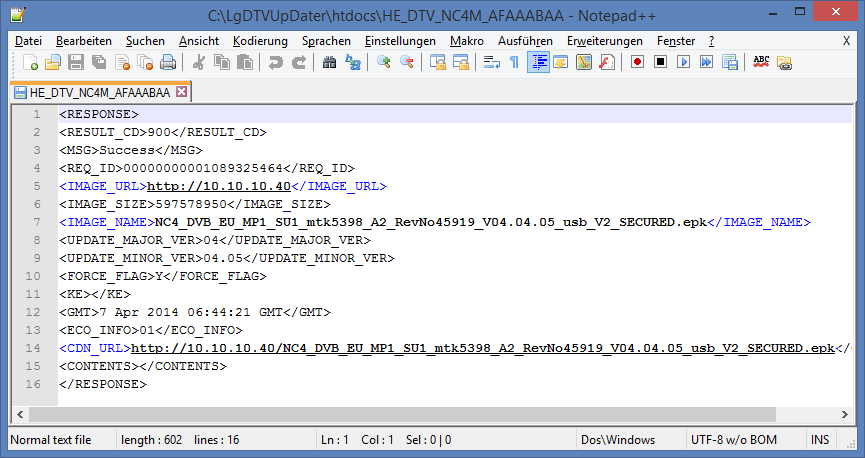
- There are only a few entries to change:
IMAGE_URL: the IP of your PC
IMAGE_NAME: name of the firmware file you unzipped
CDN_URLIP: IP of your PC and name of the firmwareYou can also change
UPDATE_MAJOR_VER: major version of the firmware
UPDATE_MINOR_VER: minor version of the firmwarebut this should only be cosmetic cause the revision number is also stored inside the epk. The FORCE_FLAG set to Y should ensure any current version being overwritten with the one you’ve downloaded, thus enabling the downgrade in the first place.
Save the file. - Now close the two command prompt windows and double-click again on C:\LgDTVUpDater\startDNS.bat and then C:\LgDTVUpDater\startHTTP.bat
- On your TV select Settings > Support > Software Update > Check Update Version: a new firmware is found! Update.
- When the update is through (which should be pretty fast since it’s done from your PC), the TV will reboot.
- Upon restart, you’ll get a message window with another progress bar (in my case a yellow frame with the foreign language text flipped). The firmware you just downloaded to your TV is now being installed. Once this is through, the downgrade is complete.
- For good measure you should reset the TV to factory defaults. Please note, that you will have to scan and sort channels after that. Even if you don’t reset, you’ll have to agree to this firmware’s terms of use before you can use Smart TV functionality. As mentioned above, these should be less restrictive than the ones you had to agree to before. If not, downgrade to an even older version ;)
Feel free to add model numbers of TVs you successfully downgraded or links to firmwares in the comment section.
 Tech Flaws
Everybody read here, very safe and easy force firmware downgrade form the remote control, works 100%:
http://openlgtv.org.ru/wiki/index.php/LG_USB_Port_Hack_on_2009_LH_series
Hi to everyone,
fist of all i’d like to say that everything works properly (in my case).
Now…
I’m trying to make another change updating to another firmware…
when tv detect new firmware (that i want to downgrade), i try to download it and message of error appear:
update has been sospended because connection is unstable… check your tv internet connection and try again.
Any idea about this issue? many thanks to all of you
I just got the LG LED TV 3D SMART 42LA6210-TD’. After updating the software, the tv colour and 3d was not showing and all the application was not showing again . Please how can I fix this.
gbenga
No, idea. Never experienced this, maybe updating to an official firmware will help. You’ve read the disclaimer, right?
NOTE: I’M NOT RESPONSIBLE FOR ANYTHING THAT MIGHT GO WRONG WITH THE DOWNGRADE – YOU’RE DOING THIS AT YOUR OWN RISK!
Hi to everyone!
i got a TV LG 42LM860V with 04.60.09 firmware (last one) and i decided to downgrade to the 4.60.03 version ‘couse LG Logo’s light doesn’t works as it should….
When i bought the Tv, (i don’t remember which firmware was on it) the logo light’s works properly (when tv was switched on, logo was on)… now with the last 2 versions of firmware, logo is switched off when tv is on, and logo is ON when tv is switched OFF! o_O
i’ve contacted the lg support’s and i tried to explain the thing…. and they told me that was a kind of energy saving.
Honestly I really don’t understand logical of this thing… so i suppose they didn’t care about my “problem” and told me a Bullshit
So…
first of all i’d like to thank you the admin of this guide who try to help us to figure out about this or other problems.
i’ve followed all the steps… and it seems gonna works (it’s still doing download of old firmware).
At the beginning i tried to connect my tv directly at my macbook pro (i had to start a VM with XP) but tv didn’t connect to internet…
So i tried to connect my TV to the router and then works fine.
downgrade has been done… but doesn’t solve my problem… :( thanks a lot
When you have downgraded successfully, disconnect the TV and do a reset to factory defaults. Maybe this will reset the LED setting.
Hi and thanks for your kind interest.
I’ve tried a lot of old firmware:
4.02.42 LOGO WORKS!!!! BUT STAND BY RED LIGHTS DOESN’T WORKS (I DON’T CARE)
4.20.38 LOGO DOESN’T WORKS
4.51.12 NO TESTED
4.52.06 NO TESTED
4.60.03 LOGO DOESN’T WORKS
4.60.05 LOGO DOESN’T WORKS
4.60.07 LOGO DOESN’T WORKS
4.60.09 LOGO DOESN’T WORKS
So i’ve decided to stay with this old version (4.02.42) … even if i don’t know what kind of new feature are in new firmwares.
Many thanks for this amazing and usefull guide.
PS. i took all firmwares into your folder (C:\LgDTVUpDater\htdocs\Antwort\LM860) and it works very very well!!!!
thanks again!
Hello,
Since I have updated my LG tv 50PM470S to firmware version 04.40.03, which is the latest version, I have youtube buffering on almost all of the videos, so that’s why I want to downgrade. I followed all the steps, but it gives me message that no update version found. In dns console, i get these messages;
2014-12-17 23:43:18.983 TResolver.Execute: Request ID 45090 received from client 192.168.178.77:43980 regarding “snu.lge.com” of type A.
2014-12-17 23:43:18.985 TResolver.Execute: Response ID 45090 sent to client 192.168.178.77:43980 directly from hosts cache.
So I don’t know whats the problem really, can you help please.
Sorry, no idea.
Hello,
My 55LM620S happened in 4.60.14 version and it was buggy.
HDD and DLNA lags, ir remote bug, etc …
I followed the tutorial and I managed to downgrade to 4.53.02 version with no problem.
Everything works again properly now;)
Thank you very much ;)
OS: Windows 7 64Bit
TV: 55LM620S (2011)
Firmware DL:
su.lge.com:80/GlobalSWDownloadCdn.laf?IMG=/201404/GP4_DVB_EU_BB_MP_SU5_mtk5369_A1_RevNo87500_V04.53.02_ota_V2_SECURED.epk
Pingback: Pilna pomoc LN575s - HDforum
I have 55LM6400-ua TV and I have been trying to downgrade the firmware for a while now. I have gotten the most out of this post… but not yet have been able to complete the downgrade. I think the issue is that the file I dowbladed has USB in the name… and it should have ota.the USB fIles are giving the unstable network error. Does anyone know where I can find the ota file for my TV model? The file I downloaded is from the lg websitw.
So what happens if you simply change the name accordingly?
The same error as before. I think the firmware know where the source is coming from and that is why it is not installing it. It is expecting from usb… but when I put it on the usb… since its older version it ignores it. I wonder if there is a way to force it via usb.
Can’t remember what version I used nor where you could search for other firmware versions except Google of course ;)
At this time I am looking in two options. To find firmware for ota… or find a way to flag force via usb. Any help would be appreciated.
Check the URL_CDN in HE_blah file. Make sure it doesn’t have the GlobalSWDownload.laf?IMG=/201312/ part left in from the examples. It should be just http://YOUR_IP_ADDRESS:80/YOUR-EPK-FILENAME. That was my problem anyway. So now it downloads the older version but the TV doesn’t install it.
Thanks all for the info here.
Unfortunately, I cannot get past the step where my TV has downloaded the downgrade (04.60.07 for my LM860v TV) and an error message states that the update has been suspended due to the network being unstable.
I hate these LG updates, the last one messed up my Plex setup and also the Simplink I had with my TV-box.
Any feedback appriciated!
Like I wrote in another reply, people have reported this message to be connected to not having installed to c:\LgDTVUpDater. I don’t know if that’s the case but if you’ve set your devices to static IPs and do the update over a wired connection, I don’t see what else could be done to remedy this. On the official forum people keep posting blacklists you can set up in your router to prevent firmware updates. Dunno if these would work where you live or if there are any repercussions like some services not working anymore though:
ad.lgappstv.com
ibis.lgappstv.com
doubleclick.net
lgsmartad.com
smartclip.net
smartclip.com
smartshare.lgtvsdp.com
yumenetworks.com
ad.lgappstv.com
ibis.lgappstv.com
yumenetworks.com
smartclip.net
smartclip.com
lgsmartad.com
DE.ad.lgsmartad.com
DE.info.lgsmartad.com
smartshare.lgtvsdp.com
kr.lgtvsdp.com
DE.lgtvsdp.com
doubleclick.net
did you get the downgrade fixed? Im the same – “network unstable”. Help!!
This usually means you haven’t extracted to C:\LgDTVUpDater. If not, make sure all is wired and on static IPs.
These should be added as well if you are in Canada, saw them pop up on the DNS requests screen
kr.lgtvsdp.com
CA.lgtvsdp.com
Rocking a 42LS5700 but my attempted downgrade to v5.1 to attempt to fix some massive wifi streaming issues that cropped up with the firmware update from Jan 2014 failed. Error after download to the TV was that the network is unstable, so maybe the firmware wasn’t the right one, but it seems it is supposed to be the one for this TV.
Meh.
Anyways thank you for the instructions on this, was worth a shot, I’ll try to keep at this to see if I can find a solution for my TV.
now all models (LG LCD and Plasma) 11-13 years are supported!!! due to frequent brick downgrade FW on ’14 models temporary is not recommended.
Guys, I really appreciate the effort you’ve put into this (which is why I don’t remove your links) but how about you add an English version of the page? Frankly, the German reads like it’s done by Google Translate .
I have set mine to a wired network, but i get a message saying network unstable and it wont update??? Any advice?
Have you unzipped to c:\LgDTVUpDater and started the downgrade from there? If not, this might be a reason.
Hi, do i need a router between tv and laptop for this procedure?
Or can i only connect tv with laptop wired with lan cable?
Will try to downgrade lgph670 plasma.
You don’t need a router, connect your TV to your laptop (you probably don’t even need a crossover cable), just make sure they’re in the same IP range.
Thanks for your response.
After 4 hour try, i couldnt make it :( (Newbee about networking)
I used cable between laptop/tv (not crossover) and got an network icon with exclamation mark.
On cmd, i got my laptop ip adress as 192.168.1.101 and wrote it to the dns section at tv, left in auto ip mode as your suggest.
But tv kept asking if server have dhcp enabled and didnt connect to laptop.
Apparently TV gets it address from DHCP and there is no DHCP server on the laptop so you need to set the TV’s IP manually. The exclamation mark already tells you something’s wrong with your network setup so you should ask a friend who knows about this stuff to help you out.
You might have figured it out by now. If not you need to set all TV settings manually. For yours TV IP = 192.168.1.102 Sub Mask 255.255.255.0 Gateway 192.168.1.101 DNS 192.168.1.101.
Your TV should now connect and find the update as long as everything you’ve named the files correctly.
Which version is the best to useful?
No idea. Check forums where people discuss these. I only wanted to be able to go back to the less privacy invading firmware which seems to differ from model to model.
can’t get it to work :-( tv says not update found :-( i ‘m on windows 7 64 bit but i can get the apache windows up and running what i can do?
I updated using my old XP laptop but I’m sure there’s an Apache version that works on Win 7 64 bit.
This procedure is unfortunately not valid for models 2014
47lb650v
Given the comments here, are you sure you did everything in the proper order? If so, you may be right and LG decided to block this way to rollback. You know how much they hate their customers.
Come the New Year the LG I have I am giving to my son and I am buying a Panasonic or a Sony… LG can go F%£$ themselves. Never again on any LG product whatsoever. By the by my son has NO Internet so they cannot farm no info from him lol :)
Thank you so much. It worked 100% on my LG TV 55LA660S. Downgraded from 04.24.33 to 04.22.07 to get rid of a major cockup done for full screen options in some apps (e.g. Red Bull app).
Tried it with my LG 55LA965W 4K TV but it did not work. Also added the other 3 servers but still it says its up to date. There must be newer and other servers it is going through when searching for the update.
Problem is solved. The model name should also be copied to the parser file CheckSWManualUpdate.LAF to replace a model in the if statements.
please, can you be more explicit
I have a 1 week LG49UB850V, stupidly enough took the firmware up to a beta that caused probs, so even more stupidly took it to service firmware 09.00.00
I’ve tried following the instrustions above but not having much luck, any advice please ??
Thank You very much for your work and this blog – You saved my day :)
Some additions I recognized, by now the TV checks some more URLs to confirm an established Internetconnection.
These are:
rdvs.alljoyn.org
fi.lgtvsdp.com
rdvs.alljoyn.org
Theyre just to be added to AcrylicHosts.txt. Besides that the howto worked like a charm!
Instead of 2nd rvds.alljoyn.org it should be
us.lgtvsdp.com